install.packages("ranger")

# for optional content only
install.packages(c("georob", "Boruta", "caret", "ale"))23 Lab: Spatial machine learning – regression
23.1 Introduction
In this computer lab you will create spatial predictions for a continuous response, often termed as regression (opposed to classification).
We will use an example soil mapping dataset from Ponui island in New Zealand. There are 155 soil samples available with soil organic carbon content (SOC, in %) sampled in soil depth of 0–20 cm (topsoil). The goal is to create a soil organic carbon content map for the whole island. We have a large number of predictors, that have mainly been derived from the elevation model (called land surface parameters or terrain attributes). One predictor comes from an older soil map.
In addition, we have 30 soil samples that were collected at locations selected with a stratified random sampling – a sampling approach ideal to evaluate model performance. We will use them to validate our map.
Download dataset: datasets.zip
Some information about the data:
Datasets are in the subfolder
datasets/ponui/dataFile path: Subsequent code examples are set up to read in the data and store the results in a folder
datasets/ponui/..in the same directory as your code. Maybe you need to adapt the file path during the practicals. Path with slash/are compatible with Mac and Linux, for Windows replace the slash with double-backslashfolder\\subfolder\\...Use topsoil organic carbon content
topsoil_socas response. You find the soil sampling data in the folderdatasets/ponui/data/soil_samples. The locations ofsoc_samples_model_calibration.csvwere determined by a sampling design optimal to train a machine learning model. The locations to evaluate model performance insoc_samples_model_validation.csvwere sampled with a stratified random sampling design which is recommended for map evaluation.The predictors derived from the elevation model are raster maps. All of them are numeric. You find them in the folder
data/terrain/attr(for terrain attributes).One predictor contains the erosion classes from the soil map (folder
data/soil, see image below).The coordinate reference system of the data is
NZGD2000 / New Zealand Transverse Mercator 2000 (EPSG:2193).The subfolder
datasets/ponui/resultsis empty. The code examples below will store the results there.In the subfolder
datasets/ponui/codethe R script is located that was used to create the predictors from the digital elevation model, the digital surface model and clipping with the land mask. This is for your information to make sure you could reproduce the same type of analysis for another study area. Terrain attributes are not discussed during this course (nor are they part of the exam).
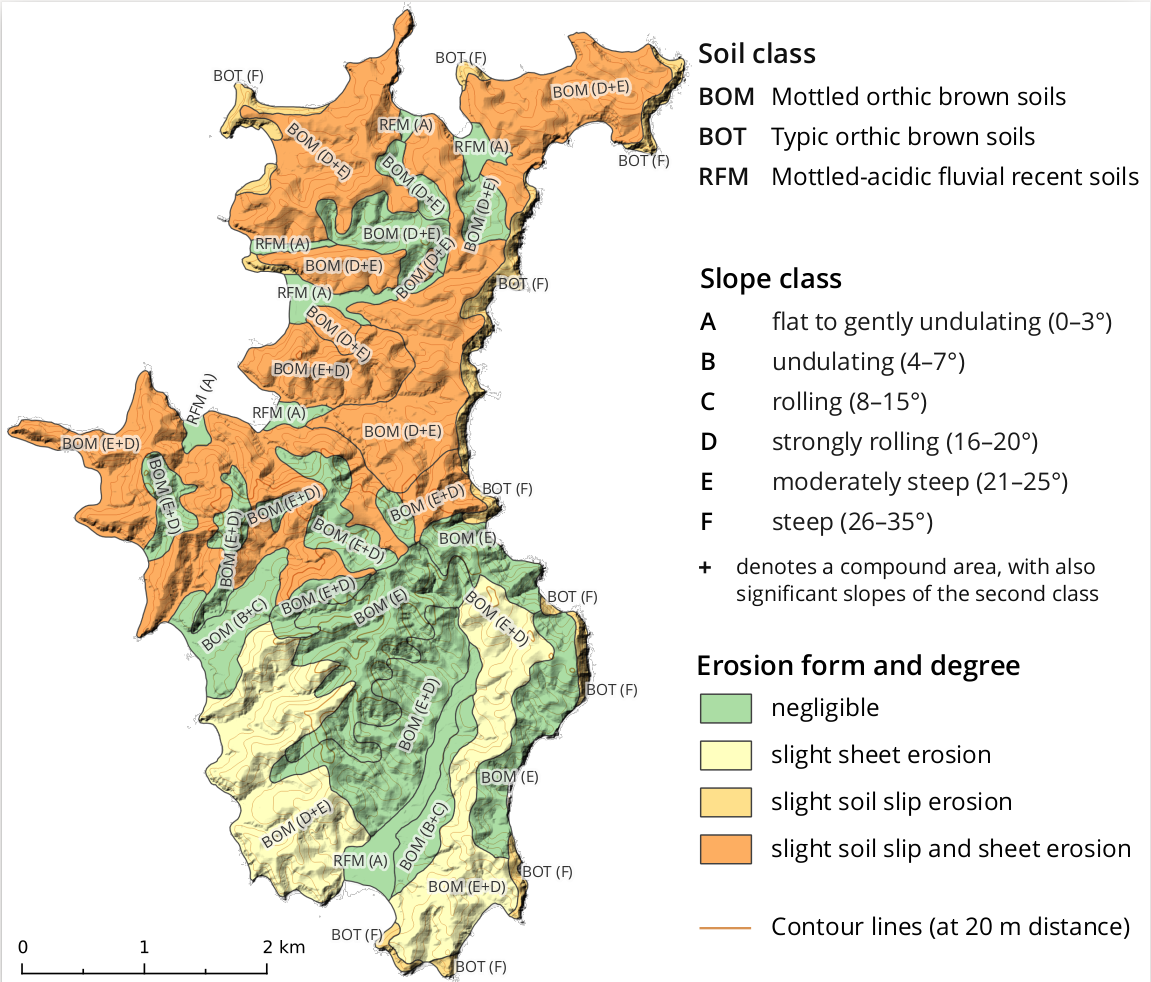
Note: the soil samples are not based on actual soil sampling, but have been generated for this example dataset from a soil map.
23.2 Install required software
Here, it is assumed you already installed the packages from the computer lab in chapter 3.
23.3 Explore and clean dataset
Before starting to fit models, it is important to understand the content of the data. Moreover, if there are issues with the data, we first need to find those issues and fix them.
Expore and clean response
TipTask
Read in the soil samples that will be used for training.
- View the data on a map.
- Create summary statistics.
CautionQuestion 23-1
What is the maximum value of the response:
6.52
8.24
99.0
8.87
Let’s continue with checking and cleaning the data.
TipTask
Investigate the value range and the completeness of the data. Remove rows from the data.frame, if needed.
CautionQuestion 23-2
What type of data cleaning have you done? (select all that apply)
None, it is not necessary.
I removed
NAfrom the data.frame.I removed strange values from the data.frame.
I removed data points that were located in the sea.
TipTask
Plot a histogram of the response.
CautionQuestion 23-3
What is the distribution of the response?
There are strong outliers present: few very large values.
The data is about Gaussian (bell-curve shaped).
The data has an uniform distribution (for each value about the same number of observations are present).
There is zero-inflation: a large number of observed values are exactly 0.
Explore and extract predictors
Let’s now screen the predictors. Even though this course does not discuss terrain attributes in detail, it is meaningful to check with what type of data you are working. Therefore, let’s at least visualize two of them.
TipTask
Plot tpi_100m.tif and tpi_750m.tif. Both contain a topographic position index (TPI), which is calculated by comparing the elevation of a center pixel to the mean of a circular neighborhood. Positive values indicate hilltops, negative values valley bottoms.
CautionQuestion 23-4
What is the difference between tpi_100m.tif and tpi_750m.tif? (select all that apply)
They contain both a TPI, computed with a different radius for the neighborhood size.
One contains the slope and the other one a TPI.
They are the same.
They represent the landscape at different scales.
To be able to fit a model we need to read out the predictor values at the locations of the soil samples. This operation is also sometimes called a spatial join.
TipTask
Read in the predictor values at the locations of the soil samples. Add new columns to the data.frame of the soil samples.
You can use this approach below. First, create a vector that contains all file path to the predictor raster. Then, create a raster stack that can be used in the extract()-function which does the actual reading out of the values.
# create a list of file path for predictors
l.rast <- list.files("datasets/ponui/data/terrain/attr/",
                     pattern = ".tif$", full.names = T)

# a) create a stack of all raster in attr
r.stack <- rast(l.rast)
# extract the raster stack values at the locations of the samples
# (d.samples = data.frame with the samples, change to your name above if needed)
d.predictors.dem <- extract(r.stack, d.samples[, c("x", "y")], ID = F)

# b) read in erosion type
d.predictors.soil <- extract(rast("datasets/ponui/data/soil/erosion_type.tif"),
                             d.samples[, c("x", "y")], ID = F)
# check the number per class
table(d.predictors.soil$erosion_type)
# this is a class, ensure it is used as a class we add the labels
# For class 3 there are not many soil samples. We merge it with class 4 by giving the same label.
d.predictors.soil$erosion_type <- factor(d.predictors.soil$erosion_type, levels = 1:4,
                                         labels = c("neg.", "sheet", "slip + sheet", "slip + sheet"))

# append predictors to soil samples
d.train <- cbind(d.samples, d.predictors.dem, d.predictors.soil)
CautionQuestion 23-5
The code results in an error. What is the problem? (select all that apply)
Not all raster have the same extent.
twi50m_s100.tifhas a larger extent than the other rasters.The rasters do not have the same CRS.
The vector with the file path is not created correctly.
Before we continue, we have either to remove the faulty raster(s) or fix it. Alternatively, we could also extract the values for the faulty raster(s) separately. In general, we prefer to fix it because it will cause us problems later for the predictions. We will need to read in all pixels to rows in a data.frame with as.data.frame() and if the rasters have different number of pixels, things will become messy.
Hint
To fix the raster, directly read it in first with r.faulty <- rast("path/to/my/file.tif"), then fix it with a suitable function and then write it back to disk with writeRaster().
CautionQuestion 23-6
How can you fix this problem? (select all that apply)
Change the
full.namesargument inlist.files()toFALSE.With the function
crop().With the function
mask().With the function
resample().With the function
extend().
23.4 Fit random forest model
In this section, the machine learning model is fitted. Optionally, predictors can be removed and the model parameters optimized (tuned).
TipTask
Fit a random forest model using ranger and print the model.
We have different options how to specify the model, either with a model formula or by giving the response as y and the predictors as x.
library(ranger)
# Option 1: model call with formula and data
rf.soc <- ranger(formula = topsoil_soc ~ ., # dot means: all columns in data
                 data = d.train[, -c(1:3)], # remove ID, x, y
                 importance = "permutation",
                 seed = 100)

# Option 2: model call with response and predictor
rf.soc <- ranger(y = d.train$topsoil_soc,
                 x = d.train[, 5:45],
                 importance = "permutation",
                 seed = 100)
CautionQuestion 23-7
Within which range is the out-of-bag R2?
0.8-0.9
0.2-0.3
0.45-0.55
Let’s have a closer look at the model call. Use ?ranger in the R console to access the help page of the function.
CautionQuestion 23-8
What does the seed = 100 argument do? (select all that apply)
Needs to be set for reproducibility. If it is changed, the results change slightly.
It ensures 100 regression trees are grown.
It controls the numeric precision of the predictions.
It is the random seed that initializes the random number generator.
CautionQuestion 23-9
Why is there an importance argument? (select all that apply)
It tells ranger to compute permuted variable importance. Otherwise, predictor importance cannot be retrieved.
It ensures the bootstrap in random forest works correctly.
It additionally shuffles the rows of the data to increase randomness of the forest.
Model selection and tuning
There is quite a large number of predictors with low importance. We could search for an optimal number of predictors (optional task). Or just use at least one third of the least important ones. The threshold is a bit arbitrary, but if we do not discard too many, likely the difference in prediction accuracy is not too big. This makes the predictions easier, as we do not need to read in that many raster.
# read out predictor importance
t.i <- importance(rf.soc)
# order it
t.i <- t.i[order(t.i)]
# select the names of the 30 most important predictors
# select from back of vector by using tail()
names.pred.selected <- names( tail(t.i, 30) )

# fit smaller model
rf.soc.sel <- ranger(y = d.train$topsoil_soc,
                     x = d.train[, names.pred.selected],
                     seed = 100)
Instead, if you want to improve your model further, go along the two next a bit more challenging tasks.
TipTask (optional)
Run the Boruta model selection algorithm with function Boruta() from the R package Boruta. Remove predictors that are considered unimportant according to the results.
TipTask (optional)
Tune the number of covariates randomly chosen for testing at each tree split (mtry). You can either implement this yourself (apply or for over the possible mtry values which are 1:number.covariates, then select mtry of the model with the lowest OOB mean squared error) or use a meta-package like caret.
Hint
Here some input how it can be done with caret:
# create a matrix with all settings to test
# we limit ourself to mtry
options.to.test <- expand.grid(
  .splitrule = c("variance"),
  .min.node.size = c(5),
  .mtry = c(5, 15, 20, ... )
)
# model training with different settings
rf.caret <- train(
  x = d.train[, names .. of covariates still in the game ],
  y = d.train$topsoil_soc,
  tuneGrid = options.to.test,
  method = "ranger",
  trControl = trainControl(method = "cv", number = 10)
)
23.5 Investigate spatial structure of residuals
The random forest above was fitted only with predictors, the spatial auto-correlation in the data has not yet been addressed by the model. We first investigate if there is spatial auto-correlation in the residuals.
To ensure the same results, from here on use the smaller random forest model with the 30 most important predictors (rf.soc.sel with names.pred.selected, see code above).
Compute the residuals as follows:
fitted <- predict(rf.soc.sel, data = d.train)
# add to data.frame for easier plotting
d.train$residuals <- d.train$topsoil_soc  - fitted$predictions
TipTask
Investigate the residuals for spatial structure.
- Create a map of the residuals.
- Plot the residuals against
xandyaxis.
CautionQuestion 23-10
Do you find spatial correlation? (select all that apply)
There is a trend East-West (x) direction.
No spatial patterns, the values of the residuals are roughly at random.
The residuals form at least some clusters of similar values.
Including spatial coordinate axis or similar will likely improve the model.
TipTask (optional, only if followed chapters 4-16 of the course)
Create a sample variogram of the random forest residuals and describe spatial auto-correlation based on the variogram.
TipTask
Test if the model can be improved by adding coordinate axis. Besides the x and y axis, also add rotations by e.g. 30 and 60 degrees as additional predictors.
Compare the OOB mean squared error of the model with and without the coordinates.
Use standard angular transformation (see e.g. Wikipedia), here for 30 degrees rotation:
a <- 30 # rotation angle
x*cos(a/180*pi) - y*sin(a/180*pi)
x*sin(a/180*pi) + y*cos(a/180*pi)
CautionQuestion 23-11
Does the random forest OOB R2 improve?
Yes, a lot.
No, it becomes worth.
It remains roughly the same.
One cannot say because the OOB computation is not valid any longer.
23.6 Predict map
In this section, you are going to create the SOC content map, showing the most probable value at each pixel of the island given the input data used.
TipTask
Prepare the data.frame to compute the predictions.
Before you can compute the predictions, you need to prepare the data for each pixel in exact the same way as above (exact same columns with same column names). Moreover, you need to remove the non-relevant pixels. Step-by-step you need to:
Read in all raster path with
list.files().Select the relevant raster path that are in
names.pred.selected. You can subset your path list by using their index e.g.l.rast[c(5,8:10,15)]. Make sureponui_dem20m_nowater.tifis also in the path list. We need it in step 5.Create a raster stack of the selected rasters with
stack().Now, each pixel has to become a row in a
data.frame. This can be achieved by applying the functionas.data.frame()to the raster stack. You can getxandycoordinates for each pixel using the argumentxy = TRUE.You have to make sure to not predict for pixels in the sea. The elevation model
ponui_dem20m_nowater.tifhas already been masked to the land area (sea is set toNA). If you followed point 2 above well, then the elevation model is part of your raster stack already. Then, you can e.g. use thecomplete.cases()function to select only rows that have no missing values (d.predictis the name of the data.frame crated in point 4):
d.predict[complete.cases(d.predict), ]- Add the rotated coordinate axis. Use the same approach as for the training data.
After these steps you have finished the data preparation. Preparing data is the largest piece of work to create predictions.
CautionQuestion 23-12
How many pixels are to be predicted? How many rows are in your prepared data.frame?
Nearly 45,000.
A bit less than 100,000.
About 67,000.
TipTask
Compute predictions for all the pixels of Ponui island and plot the result as a map.
To create the predictions use predict(), check examples on help page ?predict.ranger.
A new spatial raster can be create from a data.frame that contains the coordinates in the columns x and y:
rast(..., type = "xyz")
CautionQuestion 23-13
What is the spatial pattern you see in the predicted SOC content map? (select all that apply)
Small SOC content is predicted for the valleys.
Large SOC content is predicted for the central hills of the Southern part of the island.
Small SOC content is only predicted along the coastline.
TipTask
Compute predictions for the soil samples observed for map validation in soc_samples_model_validation.csv.
You have to implement the same data preparation steps as for the training data. Use again the extract() function.
Here, we save the data for the next computer lab.
# only select relevant columns
d.validate <- d.validate[, c("id", "x", "y", "topsoil_soc","topsoil_soc.predicted")]
write.csv(d.validate, file = "datasets/ponui/results/prediction-topsoil-soc-for-validation-points.csv")
23.7 Uncertainty map
In addtion to the prediction of the expected mean, we would like to have an indication of the uncertainty for every predicted location. We can produce this by using the distribution of the regression trees (quantile regression forest approach).
TipTask
Create a uncertainty map using random forest quantile prediction.
Re-fit the ranger model with the additional argument quantreg = T. Then, you can predict upper and lower limits of an interval by selecting quantiles – here for an two sided 80 %-prediction interval.
Investigate the resulting object with str() to extract the quantile prediction. Compute the width of the 80%-prediction interval by calculating the difference of the two quantiles.
To obtain a map of the interval width, you best add a new column with the differences to the prediction data.frame (d.predict in the example code). Then you have the coordinates and values of interest in the same data.frame that allows you to use the rast(..., type = "xyz") method as above.
pred.obj <- predict(rf.soc.sel.quant, data = d.predict,
                    type = "quantiles",
                    quantiles = c(0.1, 0.9))
CautionQuestion 23-14
What is the spatial pattern of the prediction interval width? (select all that apply)
Largest uncertainties are only found on hilltops.
Interval width are lowest in the valley bottom.
In most areas the interval width varies at small scale.